
View Markdown
Quality
The Quality panel sets how precisely the viewport, the F12 render and bakes find and draw surfaces.
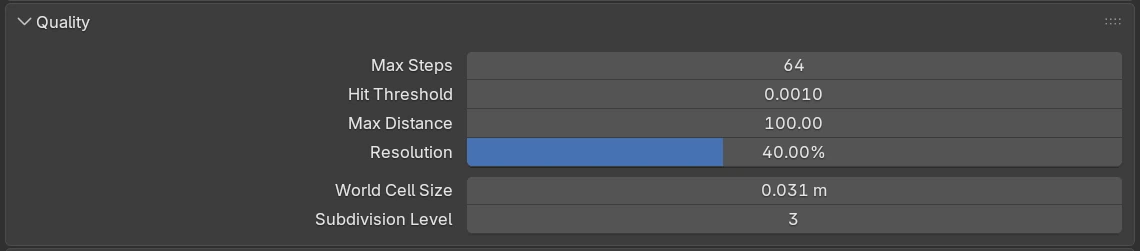
Settings
| Setting | Default | Range | What it does |
|---|---|---|---|
| Max Steps | 64 | 16 – 4096 | The most steps each pixel may take to reach a surface. Raise it if silhouettes look jagged or surfaces seen edge-on break up; lower it for speed. |
| Hit Threshold | 0.0010 | 0.0001 – 0.01 | How close to a surface counts as a hit, in Blender units. Lower values are more precise on thin parts and tight corners. |
| Max Distance | 100 | 10 – 1000 | How far from the camera surfaces are drawn. Raise it if distant objects are missing. |
| Resolution | 40% | 1 – 100% | The viewport’s resolution, as a percentage of the view’s size. When the view has been still for 0.3 s it is redrawn at full resolution. At 100% the view is always full resolution, which is slower. |
| World Cell Size | 0.031 m | from 0.000001, soft max 1 | The size of the smallest detail the viewport keeps. With Auto Cell Size on, this is the size for an object one Blender unit across. Halving it doubles the detail and uses about four times as much graphics memory. In a millimetre scene the value is shown in millimetres. |
| Subdivision Level | 3 | 0 – 4 | Finer detail where booleans act: around cuts, blends and embosses, the cell is halved this many times. 0 = the same cell size everywhere. |
Which settings each kind of output uses:
| Settings | Viewport | F12 render | Bakes |
|---|---|---|---|
| Max Steps, Hit Threshold, Max Distance | yes | yes | no: the Bake panel has its own Max Steps |
| Resolution | yes | no: F12 uses Output Properties | no: the Bake panel sets it |
| World Cell Size, Subdivision Level | yes | no: F12 draws the exact surface | yes |
Brick memory full
Brick memory full — 12,480 cells stay coarse
This red line appears under Subdivision Level when the graphics memory reserved for detail is full. The scene still renders, but the number of cells shown stay coarser than Subdivision Level asks for. The line goes away after the next update that fits. To make room, raise Brick Pool in Preferences, lower Subdivision Level, or raise World Cell Size.
Lower Resolution first
When the viewport is slow, lower Resolution before Max Steps: it gives the largest speed-up for the smallest visible change.