
From Curve
From Curve makes a Tube, an Outline or a Lathe from Blender curves you already have, point for point. It takes the place of 4.x’s curve shapes and of Convert Legacy Curve: a Chisel shape no longer follows a curve object, it copies the curve’s points once and keeps them.
Each selected curve becomes one shape, next to the curve.
Options
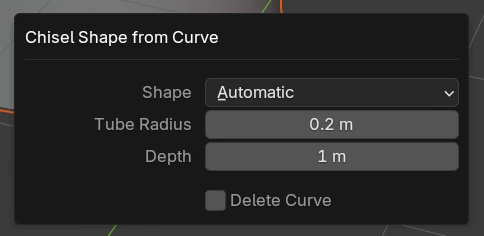
| Setting | Default | What it does |
|---|---|---|
| Shape | Automatic | What each curve becomes. Automatic: an Outline for a closed, flat curve, a Tube for any other. Tube: a tube along the curve, keeping its point radii. Outline: the curve as a closed outline, extruded by Depth. Lathe: the curve as a profile, turned round the shape’s Z axis |
| Tube Radius (Automatic, Tube) | 0.2 | The new Tube’s radius |
| Depth (Automatic, Outline) | 1 | The new Outline’s depth |
| Angle (Lathe) | 360° | The new Lathe’s Revolve Angle |
| Delete Curve | off | Off keeps the curve as it is, next to the new shape. On removes the curve, and the new shape takes its name and its place: its parent, its children and whatever pointed at it |
What carries over
- The curve’s first spline. Others are left out, with a warning.
- Every Bezier point becomes one Free point holding the curve’s own handles, so the shape follows the curve exactly. Points joined by straight edges (vector handles, poly splines) become Corners you can round.
- A Tube keeps the curve’s point radii.
- With the curve kept, the new shape is named after it (
Curve.tube,Curve.outline,Curve.lathe) and placed in the same collections. The new shapes end up selected.
The status bar reports what was made (“Made 2 Tube shape(s) from Blender curves”) and names any curve it skipped, with the reason: an empty curve, one too small to make a shape, or one with more segments than the shape holds (a Tube holds 256 segments). A Lathe profile that crosses its axis is cut off at the axis.
Curve shapes from 4.x files
Chisel 5.0 has no Curve, Curve Tube or Curve Revolve shape. A 4.x file still opens: each of them becomes an Outline, a Tube or a Lathe when the file is opened, point for point, and keeps its name, transform, parent, modifiers, materials and every boolean that uses it. Appended, linked or pasted shapes convert a moment after they arrive.
A notice lists what happened:
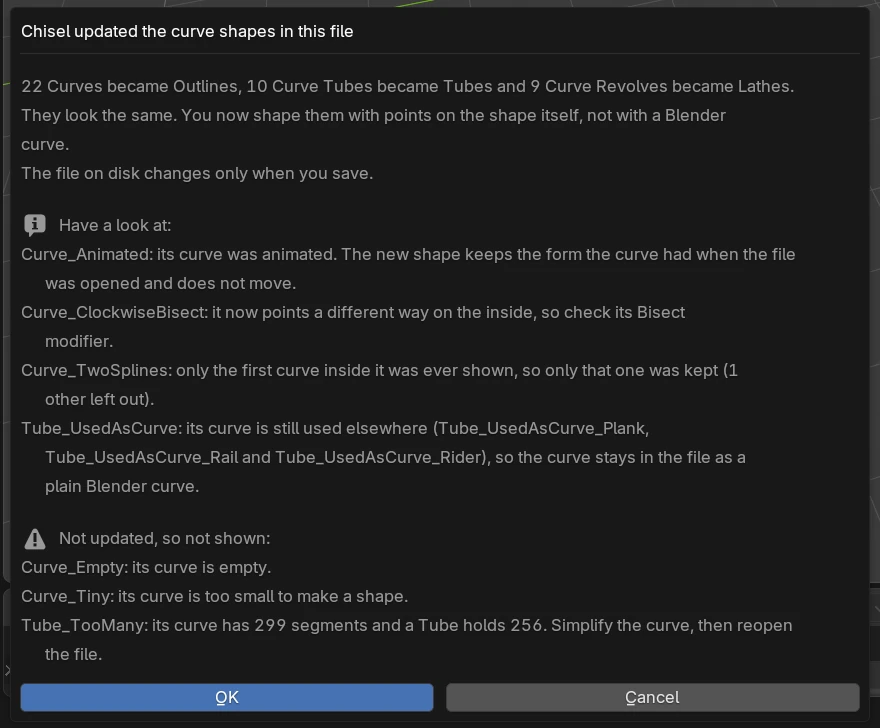
- The summary: how many shapes became what. “They look the same. You now shape them with points on the shape itself, not with a Blender curve.” The file on disk changes only when you save.
- Have a look at: shapes that converted with a note. An animated curve keeps the form it had when the file was opened. A profile drawn tilted or clockwise is turned on the inside of its object, so its Mirror, Bisect, Array, Twist, Bend, Revolve, Sweep and Lattice modifiers may point another way. A curve that something else still uses (a Curve modifier, a Follow Path constraint) stays in the file as a plain curve.
- Not updated, so not shown: shapes that could not convert. They keep their data and render nothing until they do: a shape linked from another file (open that file instead), a shape open in Edit Mode, an empty or tiny curve, or a curve with more segments than its new shape holds (simplify the curve, then reopen the file).
More than twelve shapes in a list continue in the system console (Window ▸ Toggle System Console).
The SDF panel of a shape that was not updated says so (“Old Curve Tube: not shown”) with the reason, and offers Update Old Curve Shapes to try again.
A Curve Revolve’s Rounding is not carried over: it rounded the profile, while a Lathe’s Side Rounding rounds the cut faces of a partial turn. Round the profile with its Corner points instead.
Removed in 5.0: shaping a path in Blender’s curve Edit Mode, the live link to a curve object, and Convert Legacy Curve.
See also
- Path Shapes: Tube, Outline, Rail and Lathe
- Points: Free points and their handles