
View Markdown
Baking
Baking writes normal, height, mask and diffuse maps straight from the shapes, each seen from one side by an orthographic camera. No mesh and no UVs are needed. Each selected Chisel object gets its own PNG files.
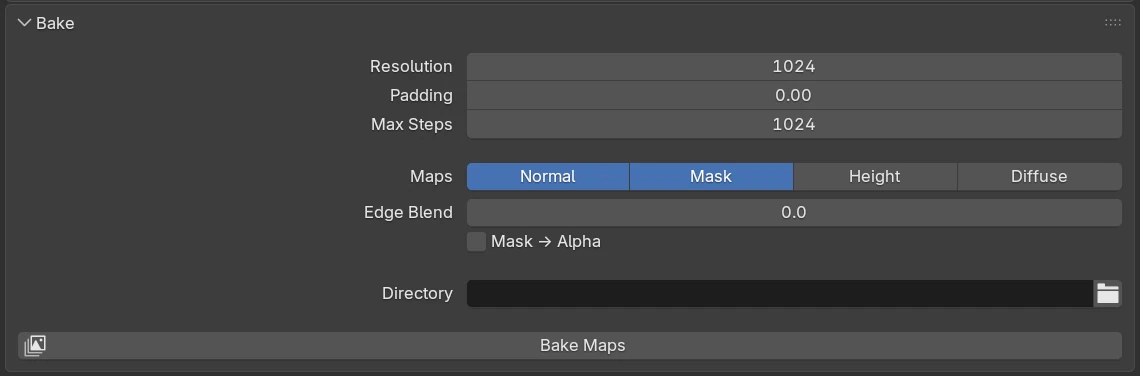
Bake panel
| Setting | Default | Range | What it does |
|---|---|---|---|
| Resolution | 1024 | 128 – 4096 | Pixels along the longer side of each map. The shorter side follows the object’s shape. |
| Padding | 0.00 | 0 – 0.5 | Share of the edge to crop off, which removes the black border around baked normals. |
| Max Steps | 1024 | 64 – 4096 | How many steps each pixel may take to find the surface. Higher is more accurate on surfaces seen edge-on. |
| Maps | Normal on | Normal, Mask, Height, Diffuse: each one on writes one PNG per object. | |
| Edge Blend | 0.0 | from 0, soft max 50 | Shown while Mask is on. Softens the mask’s edge by this many pixels. |
| Mask → Alpha | off | Shown while Mask and Normal are both on. Writes the mask into the normal map’s alpha channel. | |
| Directory | empty | The folder the maps go to. Left empty, it gets the .blend’s folder when the dialog opens. | |
| Bake Maps | Opens the Bake Maps dialog for the selected Chisel objects. |
Bake Maps dialog
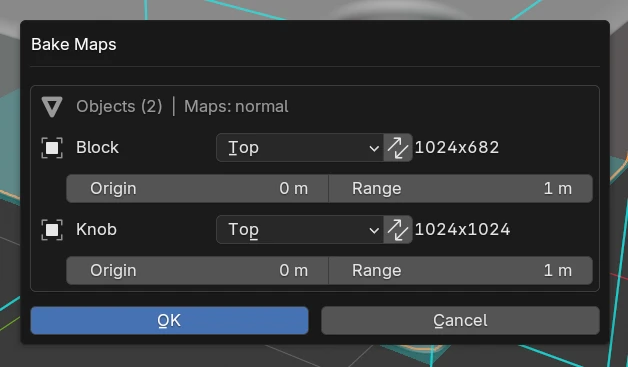
| Row | What it does |
|---|---|
| Objects (N) | Maps: … | How many objects will bake and which maps are on. |
| Object name | One row per selected Chisel object. |
| Direction | The side the bake camera looks from (below). Default Top. |
| Flip (the arrows button) | Swap width and height: the longer side runs along Y instead of X. |
| Map size | The pixel size of this object’s maps. |
| Origin | The height that maps to 50% grey in the height map. Default 0 m. |
| Range | How far the height map reaches on each side of Origin. Default 1 m. |
| OK / Cancel | Bake, or close without baking. |
| Direction | Looks |
|---|---|
| Top (default) | from above, down |
| Bottom | from below, up |
| Front | from the front (-Y) |
| Back | from the back (+Y) |
| Left | from the left (-X) |
| Right | from the right (+X) |
Each object remembers its Direction, Flip, Origin and Range. While the dialog is open, the viewport shows each object’s bake box, image plane and view direction in cyan. During the bake the status bar shows the progress; Esc cancels.
Maps
| Map | What it holds |
|---|---|
| Normal | World-space normals as RGB (R = X, G = Y, B = Z), with every rounding, blend and boolean. |
| Height | Grey depth: white nearest, black farthest, scaled by Origin and Range. |
| Mask | A white silhouette, black where the surface sits at the Origin height and faces the bake camera: the flat ground-level area. |
| Diffuse | The shape as the viewport shades it, with its matcap and colours. |
Bakes use the viewport’s detail (World Cell Size and Subdivision Level), so a Diffuse bake can differ very slightly from an F12 render, which draws the exact surface.
Height range
Set Origin to the base of the shape and Range to its height, so the height map uses the full grey scale.