
Tape Tree
The Tape tree lists the whole scene in the top left corner of the 3D View: every shape that renders, with its stack of joins and modifiers in the order Chisel applies them. It shows while the Chisel tool is active and the scene has a Chisel shape; the first gizmo icon shows or hides it.
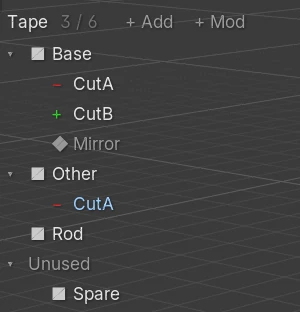
Rows
Top to bottom:
| Part | What it is |
|---|---|
| Tape N/M | The shapes that render, out of all Chisel shapes |
| + Add, + Mod | Add a shape or a modifier, see Adding shapes and modifiers |
| ▸ / ▾ | Closes or opens a shape’s stack |
| ■ Base | A shape that renders on its own, at the left edge. These rows are sorted by name |
| − CutA | A shape joined into the row above, one level in, with its own stack under it |
| ◆ Mirror | A modifier of the stack, by its kind |
| − CutA (under Other) | A target used by two stacks shows under each |
| Unused | The shapes with Render off that no stack uses. Starts closed |
| Scrollbar | Right of the longest name, when the rows do not fit |
The glyph before a name says what the row is, in the colour of its modifier dot:
| Glyph | Row |
|---|---|
| ■ | A shape that renders on its own |
| + / − / ∩ | Joined as Union / Difference / Intersect |
| ∨ | Joined as Carve |
| ▲ / ▼ | Joined as Emboss / Engrave |
| ◆ | A modifier |
| ! | A join whose target is gone: (no target), in red |
| ↺ | A join back into its own stack: (loop), in red |
A Slice shows as two rows: a Difference on the shape and an Intersect on its _slice copy. A hidden shape keeps its place, drawn dimmer.
Mouse
| Mouse | What it does |
|---|---|
| Click a name | Selects that row and its object. A modifier row selects the shape that owns the stack and makes that modifier active. A hidden shape is shown again |
Ctrl + click | Adds the row to the selection, or takes it away |
Shift + click | Selects every row from the active row to the clicked one (hidden shapes are skipped) |
Ctrl + Shift + click | Adds that range |
| Click ▸ / ▾ | Opens or closes the row |
Shift + click ▸ / ▾ | Opens or closes everything under it |
| Click a joined shape’s glyph | The join menu, see Changing how a shape joins |
| Drag a name | Moves the row, see Moving rows |
| Right-click a name | The row’s blend and rounding, see Blend and rounding |
| Wheel over the text | Scrolls the tree |
The tree selects by row: a click on a shared target lights only that row. A click beside the text reaches the view.
Selecting modifier rows also narrows the shape’s modifier handles to those modifiers. Selecting the shape’s own row, or selecting in the view or the Outliner, shows them all again.
Changing how a shape joins
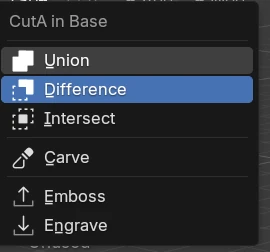
The menu, titled “CutA in Base”, lists Union, Difference, Intersect, Carve, Emboss and Engrave, the current one pressed in. A pick changes the join in place.
Moving rows
| Drop on | Puts the row |
|---|---|
| The middle of a shape’s row | Into that shape, at the end of its stack |
| The top or bottom edge of a row | Before or after it, in the same stack |
| The top line, or below the last row | Out of every stack, rendering on its own (joined shapes only) |
While dragging, a blue line marks the drop and the top line says what it will do: “CutB into Rod”, “CutB before Mirror”, “CutB: on its own”. Dragging one of several selected rows moves them all.
| Drop | Result |
|---|---|
| Inside one stack | The item changes place; pinned modifiers stay at the bottom |
| A joined shape into another stack | The join moves with its settings; a target parented to its old host is parented to the new one |
| A shape on its own, into a shape | It joins that shape as a Union |
| A joined shape on its own | It leaves the stack and renders again, shown and unparented |
A drop that would make a loop (“Base is inside CutA: that would make a loop”) or a second Smooth in one stack is refused.
Adding shapes and modifiers
+ Add
The shapes of the Add Menu. With no row selected, a pick adds the shape at the 3D cursor. With rows selected, the menu starts with “Cut into Base” (“Cut into Base +1” for more), and a pick cuts one new shape into every selected row’s shape as a Difference; the redo panel’s Join changes the operation.
+ Mod
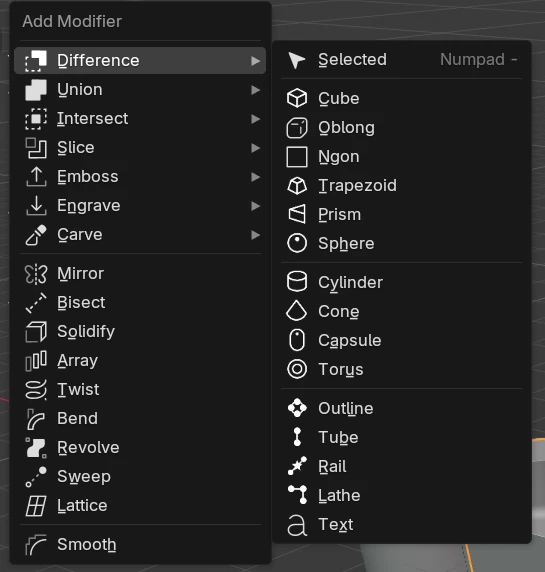
| Entry | What it does |
|---|---|
| Difference, Union, Intersect, Slice, Emboss, Engrave, Carve ▸ | Selected joins the selected shapes into the active one. A shape below it is made new and joined into every selected row’s shape |
| Mirror, Bisect, Solidify, Array, Twist, Bend, Revolve, Sweep, Lattice, Smooth | Added to every selected shape. A Mirror or Bisect goes on each shape on its own frame |
Blend and rounding
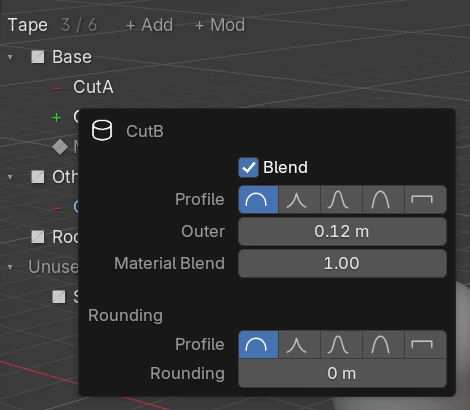
A right-click on a name opens:
| Row | Shows |
|---|---|
| A joined shape | Its join’s Blend (on/off, profile, radius, chamfer smooth); for a Boolean also Material Blend; for Emboss and Engrave the Outer and Inner edges |
| A modifier | A Mirror’s blend, an Array’s smooth, a Bisect’s cut edge, a Smooth’s radius and profile |
| A shape on its own | The Smooth of its stack |
Below them come the shape’s own Bevel and Rounding (a Lathe’s Side Rounding). A row with nothing to round says “Nothing to round or blend”. On a Boolean the blend radius reads Outer.
Each selecting click, drop, join change and add is one undo step; opening and closing rows is not.