
Display
The Display panel sets how new targets look, limits rendering to a region, and controls the proxy meshes and the stored mesh-shape data.
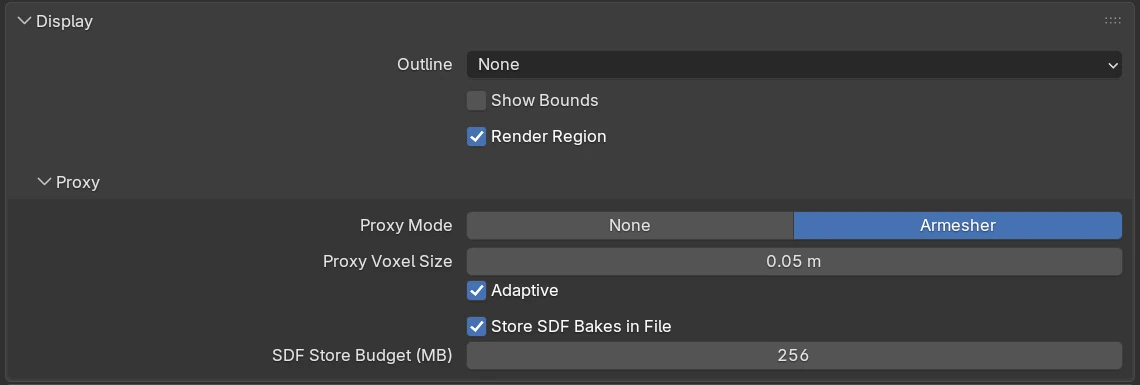
Settings
| Setting | Default | Range | What it does |
|---|---|---|---|
| Outline | None | None, Wire, Bounds | How a newly made cutter or Emboss / Engrave target is displayed: unchanged, as wire edges, or as a box. |
| Show Bounds | off | Show Blender’s bounding box on every newly made cutter or Emboss / Engrave target. | |
| Render Region | on | Render only inside Blender’s render border (Ctrl + B draws it, Ctrl + Alt + B clears it), as Cycles does. |
Proxy
| Setting | Default | Range | What it does |
|---|---|---|---|
| Proxy Mode | Armesher | None, Armesher | Armesher keeps a proxy mesh of each object that carries Chisel modifiers. None keeps the object’s base mesh as it is. |
| Proxy Voxel Size | 0.05 m | 0.001 – 10 (soft 0.005 – 1) | The detail of the proxy mesh. With Adaptive on, it is the size for a 2 m object. Greyed out while Proxy Mode is None. |
| Adaptive | on | Scale Proxy Voxel Size with each object’s size, so every proxy has about the same detail. | |
| Store SDF Bakes in File | on | Save the grids of mesh shapes in the .blend, so the file reopens without baking them again. | |
| SDF Store Budget (MB) | 256 | 1 – 2048 | The largest grid that may be stored, compressed. Greyed out while Store SDF Bakes in File is off. |
Once the file holds stored grids, a line under the budget reads, for example, Stored in file: 3 grid(s), 41 MB.
Render switch and cutters
The Render switch in Object Properties ▸ SDF decides whether Chisel renders an object. A Boolean, Emboss or Engrave turns it off on its new target. An object with Render off still shows as its mesh, wire or box, and a visible one draws a cutter outline in the colour of its modifier dot.
Proxy mesh
The proxy is a low-resolution mesh of the shape. Solid shading, EEVEE and Cycles draw it, and snapping and selection use it. A shape without modifiers shows its own base mesh instead.
- It updates by itself after every edit, once you stop moving.
- While you drag a shape that reshapes another, the other’s proxy is hidden until the drag ends.
- Changing Proxy Voxel Size or Adaptive rebuilds every proxy; Rebuild Mesh rebuilds the selection’s.
Snapping off the surface
Snapping and selection use the proxy. If they feel off, lower Proxy Voxel Size.
Mesh-SDF storage
Convert to SDF, Rebake SDF and Apply Modifiers refuse a resolution whose grid would be larger than SDF Store Budget. A file whose grids were not stored opens without freezing: each shape shows as a placeholder box until its grid has baked again.
Local view and hidden collections
- Local view (numpad
/) and Local Collections render only the shapes in view. A cutter left outside keeps cutting. - A collection hidden with its eye hides its shapes in the viewport; a cutter in it keeps cutting. F12 ignores the eye and follows Disable in Renders.
Overlays
On Blender 5.3 and newer, the grid, outlines and other overlays meet the Chisel surface itself; on older versions they meet the proxy mesh.
Native library mismatch
If the proxy reports a version mismatch, click Update Native Libraries in Preferences and restart Blender.