
Preferences
Chisel’s add-on preferences, in Edit ▸ Preferences ▸ Add-ons ▸ Chisel, have three tabs: Info, Theme and Debug. The scene’s engine settings are in Render Engine.
Info
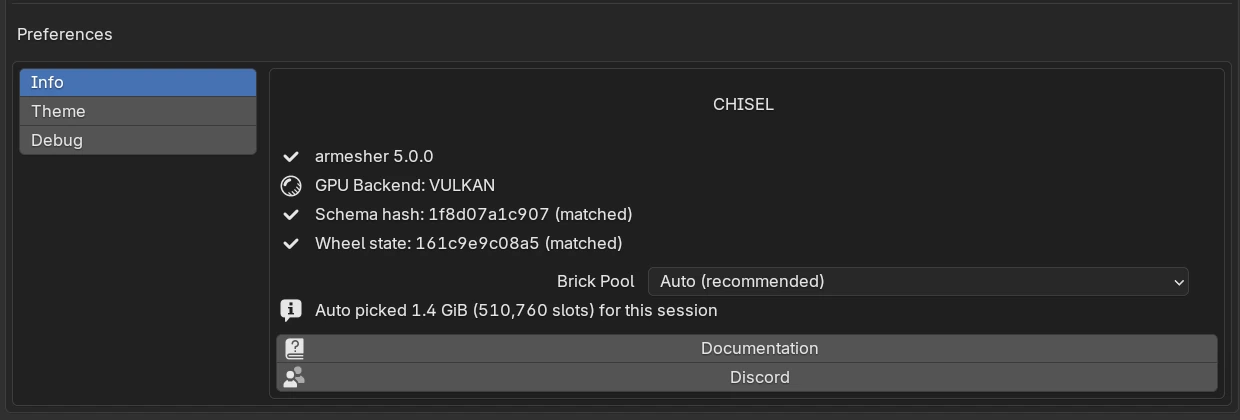
| Control | What it shows or does |
|---|---|
| armesher 5.0.0 | Chisel’s native library is loaded (a check mark). When an update is waiting, a red line says armesher update pending — restart Blender with Update Native Libraries below it |
| GPU Backend: VULKAN | The backend Blender runs on (METAL on a Mac). On Blender 5.x running OpenGL, this line is a red warning instead, with an Open System Preferences button that opens the setting to change |
| Schema hash … (matched), Wheel state … (matched) | The add-on and its native library match. When they don’t, Chisel does not enable at all, see below |
| Brick Pool | The GPU memory Chisel reserves for the fine detail of shapes, see below |
| Auto line | What Auto reserved for this session, e.g. Auto picked 1.4 GiB (510,760 slots) for this session |
| Documentation | Opens this manual |
| Discord | Opens the Chisel community server |
Brick Pool
| Option | What it reserves |
|---|---|
| Auto (recommended) (default) | Sized from the graphics card’s memory: about 0.6 GiB on a 4 GB card, up to 1.9 GiB on large cards |
| 0.6 GiB, 1 GiB, 1.5 GiB, 2 GiB | A fixed amount |
A change applies after restarting Blender. Raise it if Render Properties ▸ Quality shows Brick memory full (see Quality ▸ Brick memory full).
When Chisel does not enable
If the native library and the add-on do not match, Chisel does not enable at all and Blender shows an error starting “Chisel: armesher BUILD_HASH mismatch” or “Chisel: STALE armesher wheel”. Remove the extension, install the zip again and restart Blender.
The GPU backend
On Blender 4.5, OpenGL is the default and works, but Vulkan is several times faster: switch it in Edit ▸ Preferences ▸ System ▸ Backend. On Blender 5.x, seeing OpenGL usually means Blender’s Vulkan start-up failed, and the same driver problem affects Chisel’s renderer.
Theme
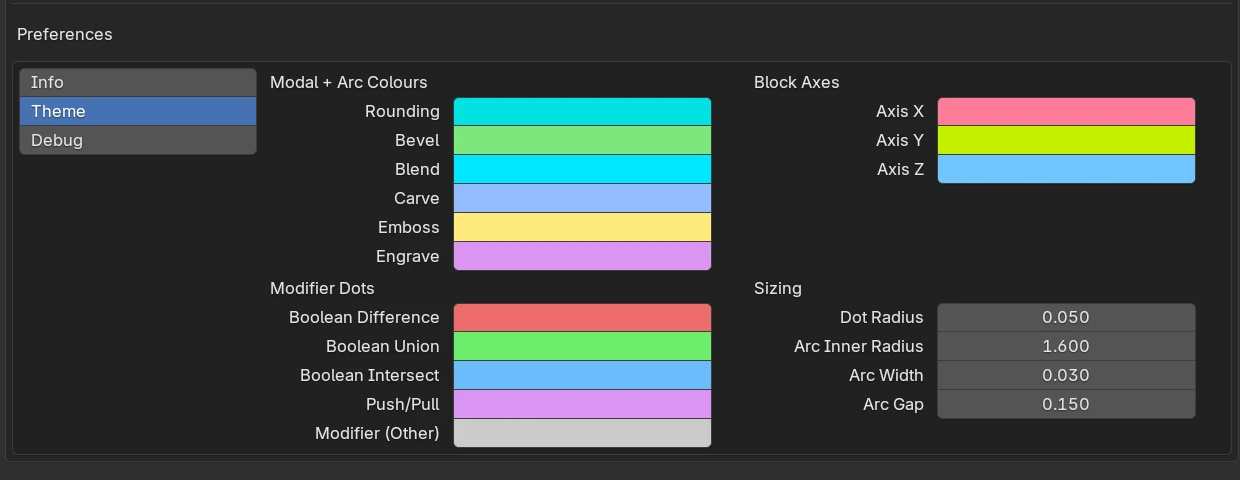
Modal + Arc Colours
The guide line a drag draws from the shape to the cursor.
| Colour | Default | Used for |
|---|---|---|
| Rounding | cyan | Edge rounding |
| Bevel | green | Upright edges of an Oblong, Prism or Trapezoid, and Ngon corners |
| Blend | light blue | Modifier blends |
| Carve | blue | The carve offset guide, the Carve target’s dot and its sign in the Tape tree |
| Emboss | yellow | Emboss blends |
| Engrave | violet | Engrave blends |
The adjust arcs themselves keep fixed colours.
Modifier Dots
| Colour | Default | Used for |
|---|---|---|
| Boolean Difference | red | Difference |
| Boolean Union | green | Union |
| Boolean Intersect | blue | Intersect |
| Push/Pull | violet | Emboss and Engrave |
| Modifier (Other) | grey | Every other modifier, and a shape with Render off that nothing uses |
These colour the target dots, the cutter outlines (a little paler) and the Tape tree’s signs.
Block Axes
| Colour | Default | Used for |
|---|---|---|
| Axis X | red | The custom plane’s X axis and the base’s X guide in Block mode |
| Axis Y | green | The custom plane’s Y axis and the base’s Y guide |
| Axis Z | blue | The height guide along the plane’s normal |
Sizing
| Setting | Default | Range | What it does |
|---|---|---|---|
| Dot Radius | 0.050 | 0.01 – 0.5 | The size of every Chisel handle on screen. Handles keep this size at any zoom and follow Blender’s Gizmo Size preference |
| Arc Inner Radius | 1.600 | 0.5 – 5 | No effect in 5.0: the arcs have a fixed size |
| Arc Width | 0.030 | 0.005 – 0.5 | No effect in 5.0 |
| Arc Gap | 0.150 | 0 – 1 | No effect in 5.0 |
Debug
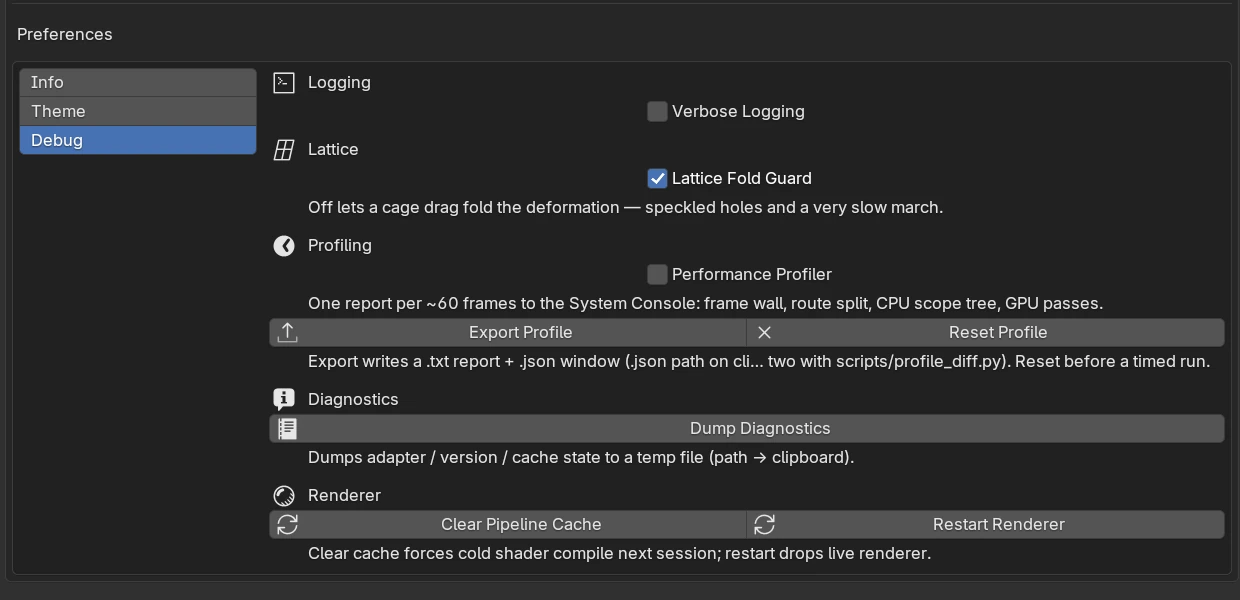
| Control | Default | What it does |
|---|---|---|
| Verbose Logging | off | Prints Chisel’s progress messages (shader cache, render progress, start-up timings) to Blender’s system console. Errors and warnings always print |
| Lattice Fold Guard | on | Stops a Lattice cage point where the cage would fold over itself. Past a fold the surface breaks into speckled holes and the render slows to a crawl; turn it off only to see that on purpose |
| Performance Profiler | off | Prints a timing breakdown to the system console about every 60 frames |
| Export Profile | Saves the profiler’s numbers to a report file and copies its path | |
| Reset Profile | Clears the profiler’s numbers before a timed test | |
| Dump Diagnostics | Writes a report about your graphics card, Chisel’s version and settings to a file and copies its path. Attach it to a bug report | |
| Clear Pipeline Cache | Deletes the saved shaders, so the next session compiles them again. It also turns the shader cache back on after Chisel turned it off (see below) | |
| Restart Renderer | Restarts Chisel’s renderer; the next frame builds it anew |
The system console is Window ▸ Toggle System Console on Windows; on Linux and macOS, start Blender from a terminal.
The shader cache and driver crashes
Chisel saves the compiled shaders so the next session starts fast. Some drivers (Intel’s Vulkan driver in particular) crash inside that saved cache. When that happens, Chisel notices at the next start and turns the cache off, so you get a slower first frame instead of a crash. Clear Pipeline Cache turns it back on when you want to try again.