
Emboss & Engrave
Emboss raises the surface of one shape, the host, wherever another shape, the stamp, passes through it. Engrave sinks it there instead. The step this makes has two edges, Outer and Inner, and each can be rounded.
Emboss and Engrave buttons
Emboss and Engrave in the pie (South) and in the right-click Modifiers menu mark the active shape, the host, with every selected Chisel shape as a stamp. Each stamp gets its own modifier with a Strength of 0.1, and:
- stops rendering on its own and shows a violet outline;
- becomes a child of the host, if it had no parent;
- stays selected, the first one active.
With a stamp or a Boolean cutter selected, ' and ; also switch its join to Emboss or Engrave (see Boolean). Add Modifier in the panel adds an empty Emboss or Engrave; you then pick its Target in the panel.
Mode
Emboss
Raises the host’s surface by Strength where the stamp passes through it.
Engrave
Sinks the host’s surface by Strength where the stamp passes through it.
Strength
How far the mark stands out of the surface (Emboss) or goes into it (Engrave). It is measured from the surface, so on a curved shape the mark follows the curve. Where the stamp reaches less than Strength past the surface, the step is only as high as the stamp.
Color Edge
With Color Edge off, the stamp’s material colours only the raised top or the sunk floor, and the wall of the step keeps the host’s colour. With it on, the wall takes the stamp’s colour too, blended across the Outer edge.
Outer and Inner
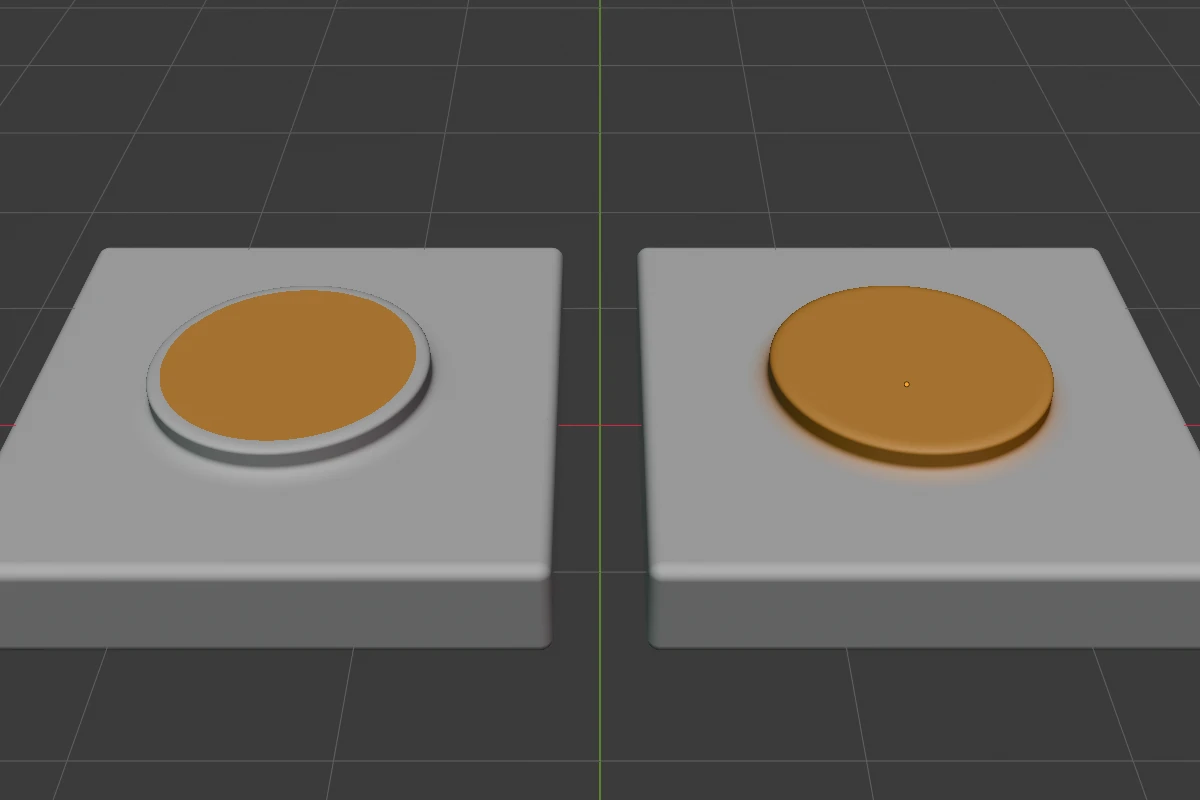
Outer rounds the edge where the step meets the surrounding surface; Inner rounds the top of a raised feature or the floor of a sunk one. Each has its own radius, profile and, on Chamfer, Smooth.
Settings
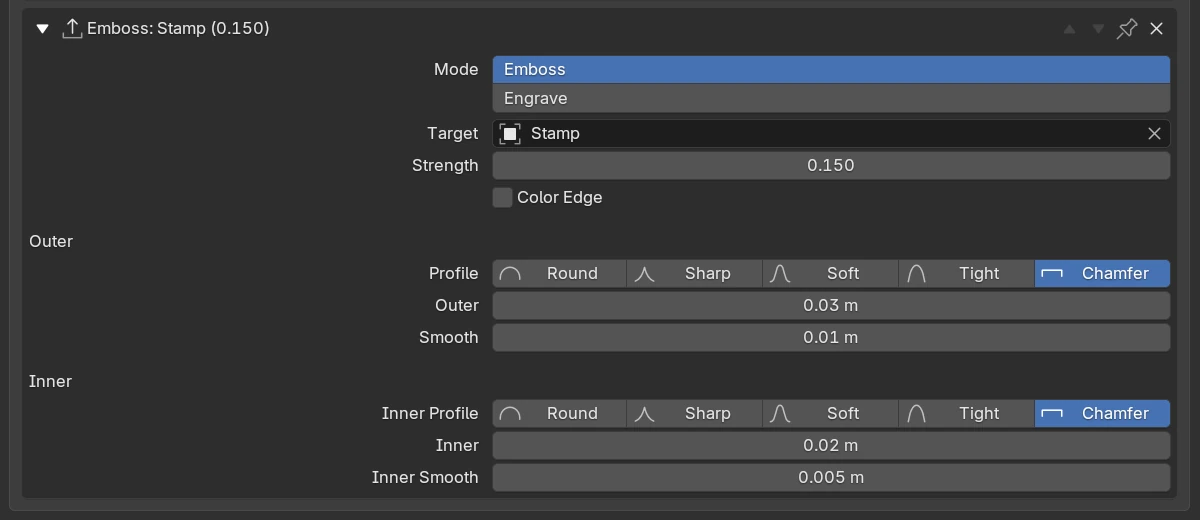
| Setting | Default | Range | What it does |
|---|---|---|---|
| Expand arrow | closed | Shows or hides the settings. | |
| Header | Emboss: or Engrave:, the stamp and the strength, e.g. Emboss: Stamp (0.150); (no target) in red when the stamp was deleted. | ||
| Move up, Move down | Move the modifier in the stack. | ||
| Pin | off | Keep the modifier at the end of the stack. | |
Remove (X) | Delete the modifier. | ||
| Mode | Emboss | Emboss, Engrave | Raise or sink the surface. |
| Target | none | any Chisel shape but the host | The stamp. A stamp picked here stops rendering too, but is not made a child of the host. |
| Strength | 0.1 | 0.001 – 10 (soft max 1) | The height of the step. |
| Color Edge | off | Colour the step with the stamp’s material too. | |
| Profile (under Outer) | Round | Round, Sharp, Soft, Tight, Chamfer | The outer edge’s profile. |
| Outer | 0 m | 0 and up (soft max 2) | The outer edge’s radius. |
| Smooth | 0 m | 0 and up (soft max 0.5) | Rounds an outer Chamfer’s two edges. Shown on Chamfer. |
| Inner Profile (under Inner) | Round | Round, Sharp, Soft, Tight, Chamfer | The inner edge’s profile. |
| Inner | 0 m | 0 and up (soft max 2) | The inner edge’s radius. |
| Inner Smooth | 0 m | 0 and up (soft max 0.5) | Rounds an inner Chamfer’s two edges. Shown on Chamfer. |
Viewport handles
With a stamp selected, three arcs show at the top right of the selection: yellow for an Emboss, violet and a little higher for an Engrave. From the inside out they are:
| Handle | Drag outward | Keys while dragging |
|---|---|---|
| Strength arc | A higher Strength on every Emboss (or Engrave) that uses the stamp | Shift precision, Ctrl snap |
| Inner arc | A larger Inner radius | Shift, Ctrl, 1–5 profile, S Smooth |
| Outer arc | A larger Outer radius | the same |
The stamp’s violet outline is display only: click the stamp there to select it. A violet target dot at its origin shows when Dots are on.
Keys
| Key | What it does |
|---|---|
' / ; | Next / previous join for every modifier that uses the selected stamp |
Ctrl + B | Drag the Outer radius of every modifier that uses the selected stamp. Keys: see Blending |
In the menus
- Pie
Q, South: Emboss and Engrave start the first grid’s second row. - Pie, East, with the host active: two rows per modifier: inner profile icons, Inner, its Smooth, Strength; outer profile icons, Outer, its Smooth, the stamp’s name.
- Pie, South-West, with a stamp selected: the outer profile icons and Outer, the inner profile icons and Inner (each with Smooth on Chamfer), then Emboss or Engrave, which drags the strength.
- Right-click, with a stamp selected: Outer Profiles ▸, Outer, Inner Profiles ▸, Inner (each with Smooth on Chamfer), then Emboss or Engrave.
- Tape tree: a stamp is listed under the host with ▲ (Emboss) or ▼ (Engrave).
Tips
Text stamps
A Text shape’s letters are extruded from the text’s plane in one direction, along its local Z axis. Place that plane below the host’s surface so the letters pass through it.
Limits and known issues
Mesh stamps
With a Mesh shape as the stamp, keep Strength and the radii within its Field Margin, or raise the margin and press Rebake SDF.
See also
- Boolean, Carve: the other joins
- Profiles
- Clean Mods: removes a modifier whose stamp was deleted