
View Markdown
Quality
The Quality panel sets how precisely the viewport, the F12 render and bakes find and draw surfaces.
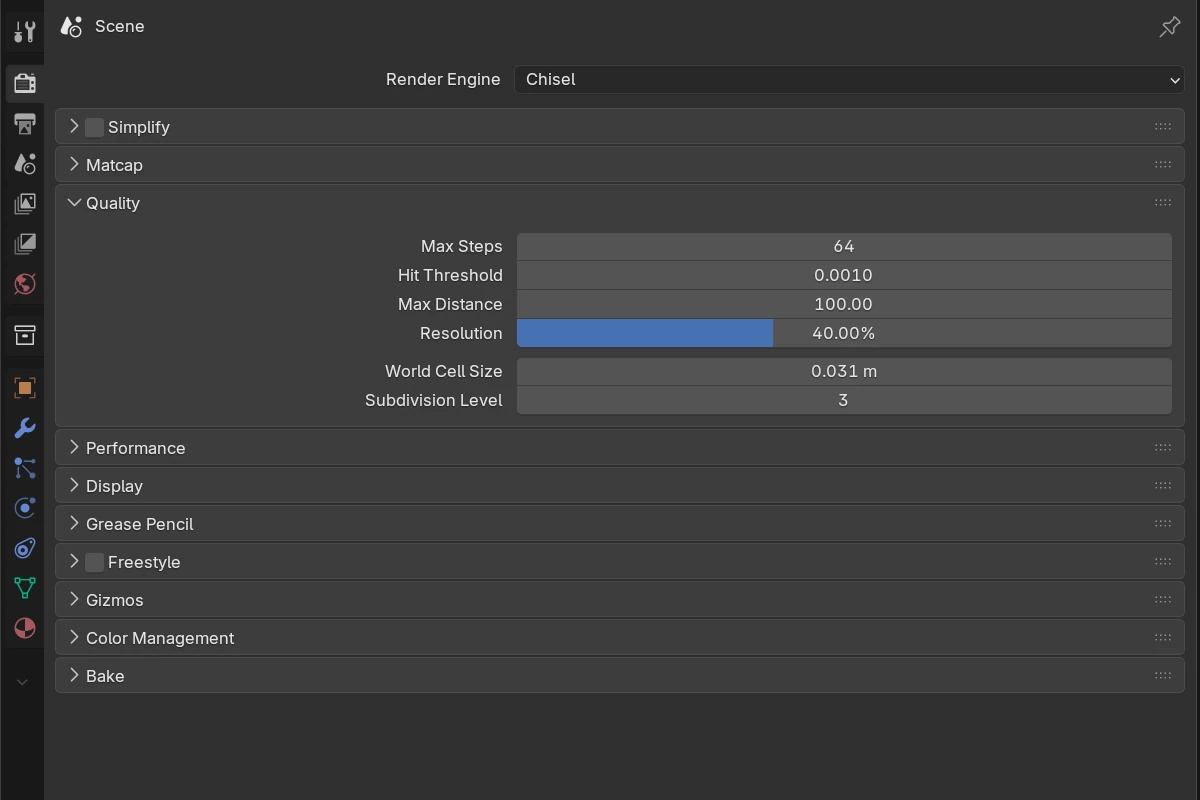
Settings
| Setting | Default | Range | What it does |
|---|---|---|---|
| Max Steps | 64 | 16 – 4096 | The most steps each pixel may take to reach a surface. Raise it if silhouettes look jagged or surfaces seen edge-on break up; lower it for speed. |
| Hit Threshold | 0.0010 | 0.0001 – 0.01 | The largest distance from a surface that counts as a hit, in Blender units. Lower values are more precise on thin parts and tight corners. Zooming in tightens it on its own, so the slider is an upper limit. |
| Max Distance | 100 | 10 – 1000 | How far from the camera surfaces are drawn. Raise it if distant objects are missing. |
| Resolution | 40% | 1 – 100% | The viewport’s resolution, as a percentage of the view’s size. A view that has stopped moving stays at this resolution; raise it for a sharper still view. 100% is always full size, which is slower. F12 uses the output size instead. |
| World Cell Size | 0.031 m | from 0.000001, soft max 1 | The size of the smallest detail the viewport keeps. With Auto Cell Size on, this is the size for an object one Blender unit across. Halving it doubles the detail and uses about four times as much graphics memory. In a millimetre scene the value is shown in millimetres. |
| Subdivision Level | 3 | 0 – 4 | Finer detail where booleans act: around cuts, blends and embosses, the cell is halved this many times. 0 = the same cell size everywhere. |
Which settings each kind of output uses:
| Settings | Viewport | F12 render | Bakes |
|---|---|---|---|
| Max Steps, Hit Threshold, Max Distance | yes | yes | no: the Bake panel has its own Max Steps |
| Resolution | yes | no: F12 uses Output Properties | no: the Bake panel sets it |
| World Cell Size, Subdivision Level | yes | no: F12 draws the exact surface | yes |
Brick memory full
Brick memory full — 12,480 cells stay coarse
This red line appears under Subdivision Level when the graphics memory reserved for detail is full. The scene still renders, but that many cells stay coarser than Subdivision Level asks for. The line clears at the next settled view where every cell fits. To make room, raise Brick Pool in Preferences, lower Subdivision Level, or raise World Cell Size.
Lower Resolution first
When the viewport is slow, lower Resolution before Max Steps: it gives the largest speed-up for the smallest visible change.