
View Markdown
Interface
Where Chisel’s parts sit in the Blender window.
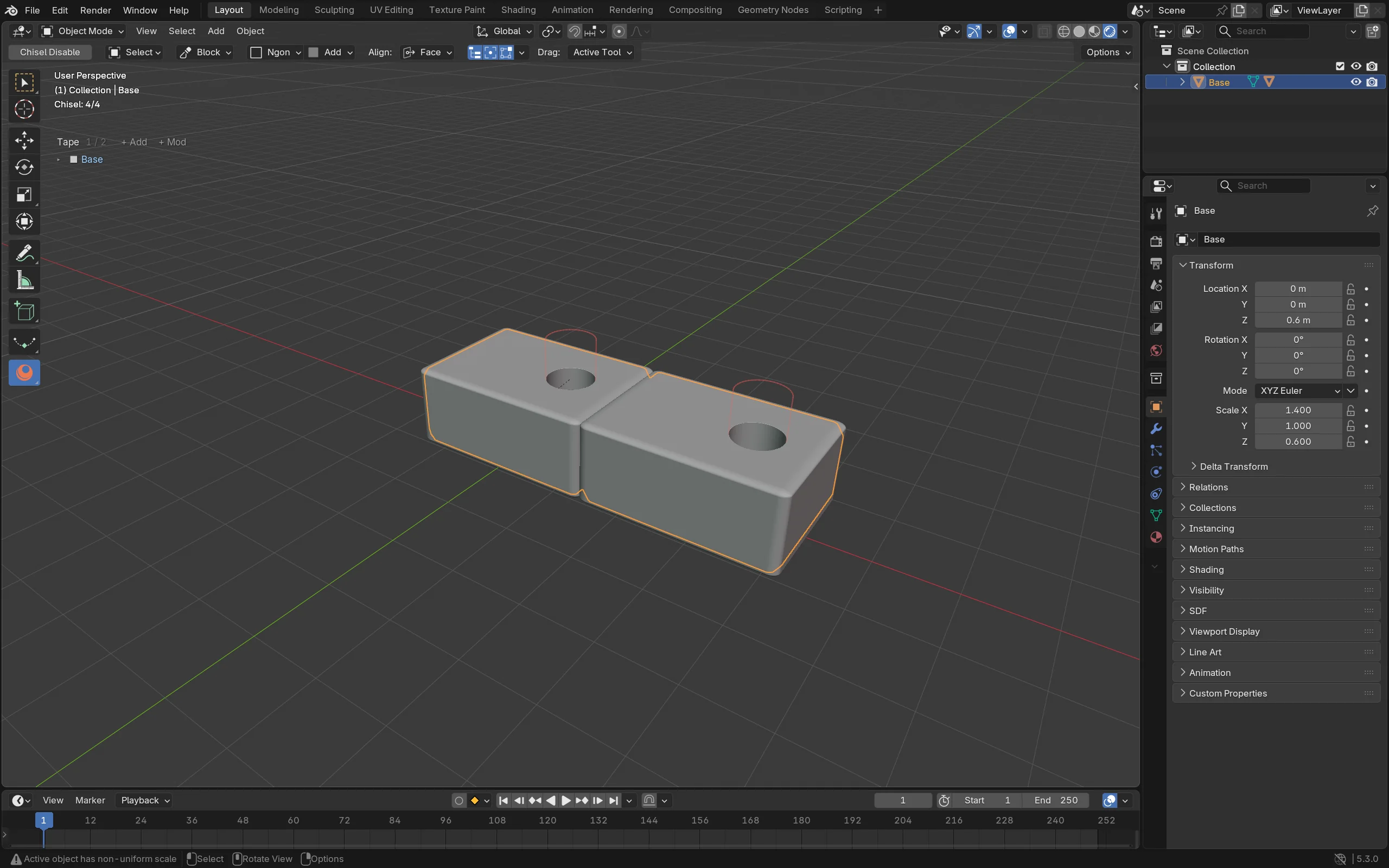
The window
Top left to bottom right:
| Area | Where | What it holds |
|---|---|---|
| Tool settings row | Above the 3D View, while the Block tool is active | Chisel Disable, the Select / Edit drop-down, Mode and the mode’s settings, the gizmo icons and their drop-down. See Block Tool |
| Gizmo icons | Right end of the tool settings row | Which handles and overlays show: the Tape tree, the outlines and origins, the shape handles. See Block Tool ▸ Gizmo icons |
| Tool bar | Left edge of the 3D View | One button for the Block and Sketch tools, among Blender’s tools. Alt + Q swaps the two, and from another tool returns to the one used last. See Block Tool and Sketch Tool |
| View text | Top left of the 3D View | Blender’s view name and object, then Chisel’s status line. See Status Bar & Messages |
| Tape tree | Under the view text | Every shape of the scene with its stack. See Tape Tree |
| Handles | On the selected shapes in the view | Drag a dot or an arc to change a rounding, a blend or a modifier. See Gizmos |
| Properties editor | Right of the 3D View | Chisel’s panels on four tabs: Render (the engine), Object (SDF: the Chisel switch, Render and the object buttons), Modifiers (Field, Modifiers and Values), Material. See Properties Panels |
| Redo panel | Bottom left of the 3D View, after an add or a draw | The new shape’s values. See Add Menu and Block Mode |
| Status bar | Bottom of the window | During a Chisel drag, the keys it answers to. See Status Bar & Messages |
Menus over the view
These open at the cursor while the Block tool is active.
| Key | Menu | Page |
|---|---|---|
Shift + A | Add Chisel Primitive: every shape | Add Menu |
Q | The pie menu: shapes, modifiers, profiles and drags, engine actions | Pie Menu |
RMB | Chisel’s right-click menu | Right-Click Menu |
D | The tool’s popup: the modes and the mode’s settings | Block Tool ▸ The D popup |
With any other tool, Blender’s own Shift + A menu has Chisel and Chisel Actions at its end, see Add Menu.
Elsewhere
| Where | What | Page |
|---|---|---|
Edit ▸ Preferences ▸ Add-ons ▸ Chisel | Status, GPU memory, theme colours, debug tools | Preferences |
Edit ▸ Preferences ▸ Keymap | Chisel’s keys, under 3D View Tool: Object, Chisel: Block and Chisel: Sketch | Keymap |
| Render Properties ▸ Render Engine | Chisel, the engine that draws the shapes | Render Engine |