
Performance
The renderer runs the heavy work on the GPU and refines the frame in rungs. While you orbit, pan, or drag a gizmo it renders at a coarse rung that holds your target framerate; once you stop, it climbs rung by rung to full quality. Shapes bake into sparse brick volumes incrementally and in the background, and since 4.1 camera navigation on a still scene draws a cached mesh instead of re-marching every frame.
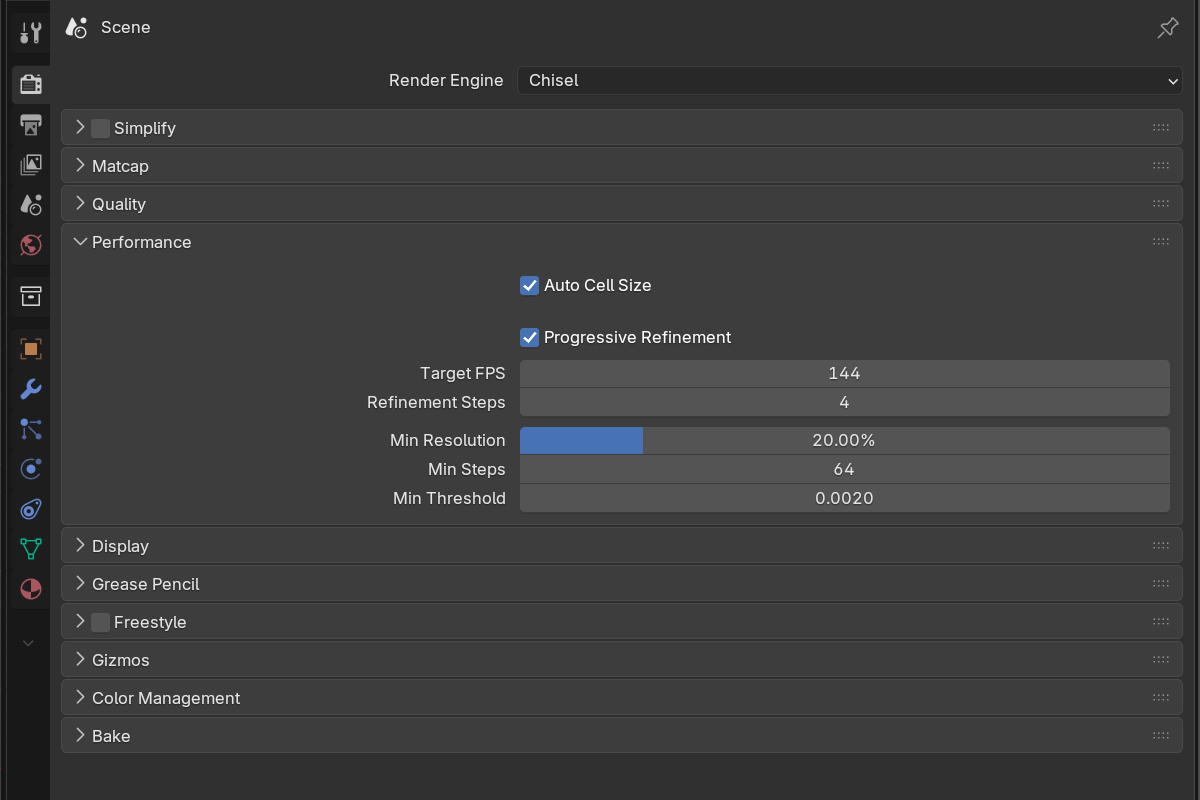
Auto Cell Size
- Auto Cell Size: default on. The World Cell Size is an absolute length, so on its own it is really calibrated for objects around 1 m: detail costs grow with the square of an object’s size, so an 8 m blockout could spend 64× what the same setting costs a 1 m object, or fall back to the slow analytic path entirely. With Auto on, the Quality value is read as the cell for a 1 m object and every object scales from its own dimensions. Detail, and cost, per object no longer depend on how big you built it, and independent objects get independent cell sizes.
Object size is measured by surface area rather than longest side, which keeps long thin parts (rails, tubes, panel lines) at full detail. A 1 m object renders exactly as before; a file with much larger objects re-bakes coarser and considerably faster the first time you open it, and much smaller objects gain detail. Untick for the previous behaviour, one absolute cell size for the whole scene. Subdivision Level applies on top either way.
Progressive refinement
Instead of a hard navigation/settled split, the renderer walks a ladder of quality rungs. Rung 0 is the coarse interactive pass; the top rung is full Quality. Any motion (camera move, an edit, a modal property change) drops back to the interactive rung and restarts the climb.
- Progressive Refinement: default on. Off = full quality every frame, no ramp.
- Target FPS:
5–200, default144. The framerate the interactive rung aims to hold. The picker drops to a lower rung on heavy frames and rises back up when the GPU has headroom. - Refinement Steps:
1–12, default4. How many rungs sit between the minimums and full quality. More rungs = a smoother ramp but more passes;1= always full quality, no ramp. - Min Resolution:
1–100%, default20%. Rung 0’s resolution: the coarsest the interactive pass will drop to. - Min Steps:
4–128, default64. Rung 0’s ray-march step budget. Kept high enough that the march still reaches surfaces while moving. - Min Threshold:
0.0001–0.05, default0.002. Rung 0’s hit threshold, tightening toward Hit Threshold as it refines. Set it equal to Hit Threshold to keep the surface exact across all rungs, with no silhouette shift while refining.
The viewport header shows the climb as Chisel: 2/4 while a frame refines.
Camera navigation
Orbiting, panning or zooming a scene that has already settled no longer re-renders every frame. Chisel draws a mesh sampled once from the baked bricks and moves that; the exact ray-marched frame returns the moment the camera stops, and any edit goes straight back to the real thing. The navigation image is an approximation on purpose (finite resolution, flat colour and simple lighting) so expect it to look a little coarser than the settled frame. After an edit, only the parts of that mesh the edit touched are rebuilt.
Incremental brick bakes
Shapes bake into sparse brick volumes rather than being evaluated from scratch every frame. Those bakes are:
- Incremental: only the edited region of a shape re-bakes
- Asynchronous: the bake runs in the background, so dragging no longer hitches
- Coarse-first: during a drag only the base-level bricks rebake; the fine Subdivision Levels catch up when you let go
- Move-aware: moving a whole chain around the scene is one rigid pose update, not a rebuild, and repeated moves never accumulate error; the proxy mesh rides along
- Remembered: going back to a position you already had (undo, redo, typing a value back) restores the baked result instantly instead of rebaking it
- Instance-aware: static camera orbits never re-bake unchanged mirror or array shapes
Editing a shape inside a boolean chain also releases the detail it vacated: growing a cutter no longer leaves bricks behind in the volume it used to occupy.
Edges
Silhouettes and object-over-object edges are anti-aliased analytically in the base march, every frame, at any resolution. There is no separate edge pass to configure any more; if boolean creases look soft, raise Resolution.
Brick memory
When the brick pool cannot hold every refined cell, the Quality panel shows a red Brick memory full row. Raise Brick Pool in Preferences, lower Subdivision Level, or raise World Cell Size.
Per-chain limits
Each chain is capped at 256 primitives and 512 instructions. The modifier panel’s toolbar shows an Objects N/256 readout for the active object’s chain, turning red past ~80% of the budget; a Modifiers M/… readout appears once that cap is half used. Over-limit primitives are dropped and the instruction list is truncated with a console warning. A chain nested very deep (around fifteen boolean levels) now fails loudly for that chain alone instead of erroring on every frame.
Known behaviour
Releasing a drag on a very heavy scene can still pause for a moment while the fine detail settles. It is much shorter than in 4.0 and no longer freezes Blender outright.
See also
- Quality: settings the top rung and the F12 render use
- F12 Render: the camera render forces full quality (no ramp)
- Display → Proxy Mesh: alternative viewport for EEVEE/Cycles