
Convert to SDF
Turn any mesh object into a Chisel shape. Convert Mesh to SDF bakes the mesh into a signed-distance grid once, and from then on the object is a Mesh primitive: it takes booleans, carves, blends, mirrors, arrays and materials like any native shape, and renders in the ray-marched viewport alongside them.
How to use
- Select one or more regular mesh objects.
- Run Convert Mesh to SDF:
- right-click with the Chisel tool active and pick Convert to SDF, or
- click the Convert Mesh to SDF button in Object Properties → SDF, under Enable Chisel.
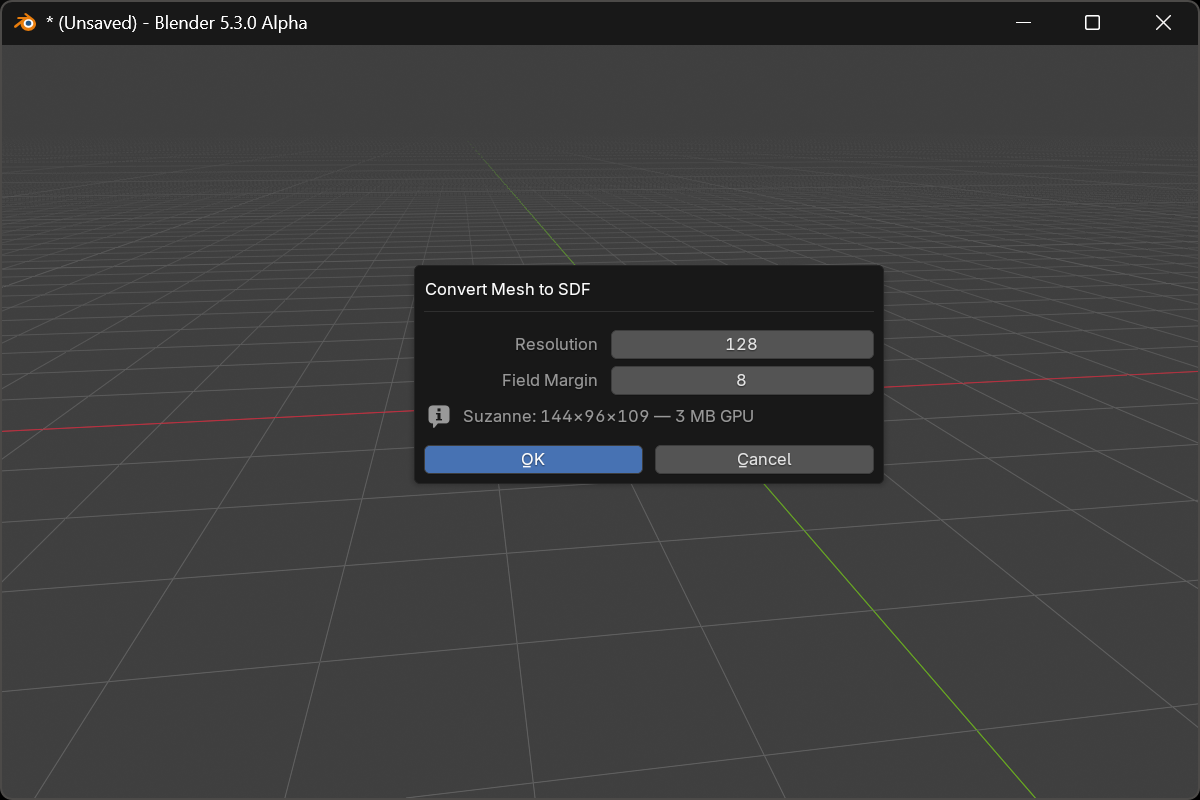
- Set Resolution and Field Margin, read the estimate line, and confirm.
The bake runs in the background. The status bar shows Chisel: baking SDF 40% (1/3) — Esc to cancel and each object appears as soon as its grid lands. The original mesh stays as the object’s data and doubles as its display proxy, so the object keeps its wireframe, bounds and selection outline.
Options
- Resolution: grid cells along the mesh’s longest axis (default
128, range8–1024). The single biggest quality-versus-cost lever: above roughly256a grid costs gigabytes of GPU memory and the bake takes minutes. - Field Margin: the exact-field shell baked around the surface, in voxels (default
8, range6–64). Emboss strengths, blend widths and carve offsets that reach further than this shell go coarse, so raise it when you plan wide blends against the mesh.
Under the two sliders, one line per selected object prices the grid live as you move Resolution: Suzanne: 144×96×109 — 3 MB GPU. A grid that would not fit this GPU, or the SDF Store Budget, turns red and names the largest resolution that does. Nothing bakes while any object is refused.
After conversion
The object is a Mesh primitive and behaves like any other shape. Move a cutter and the cut follows live:

- Boolean or carve it against native primitives with smooth blends
- Emboss or engrave a mesh stamp into a Chisel surface
- Mirror and array it; arrayed copies reuse one baked grid
- Give it a Chisel material and it shades with the rest of the scene
Rebaking and storage
- Bake Resolution and Field Margin live on the object panel next to Rebake SDF. Editing the source mesh does not re-bake by itself; the panel shows SDF is stale — mesh edited until you press Rebake.
- The grid is stored compressed inside the
.blend, so the file reopens without a bake. A grid this GPU cannot show draws as a placeholder box with a Rebake to fit button: see Mesh Primitive. - A mesh shape is never reached by
[/]or the Type menu; conversion is always explicit.
Notes
- The bake reads the evaluated mesh, so Blender modifiers on the source are applied first. Smooth-shaded sources bake smooth, flat-shaded ones bake faceted.
- A winding confidence warning means the mesh has mixed face orientation and the inside may be wrong in places. Run
Mesh → Normals → Recalculate Outsideand convert again.
See also
- Mesh Primitive: the shape’s parameters, rebaking, storage
- Convert to Mesh: the opposite direction
- Apply Modifiers: bake a chain into one mesh shape